
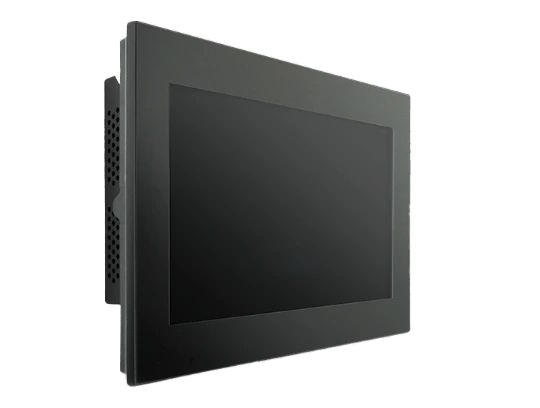


Siemens TP1200 touchscreen: Fast, efficient repairs

Introduction
The Siemens TP1200 touch screen is an essential component of modern industrial automation systems. This sophisticated human-machine interface (HMI) enables operators to precisely control and monitor production processes.
The reliability of this equipment is crucial to maintaining production line productivity. Touch screen failure can lead to :
- Costly production stoppages
- Major data loss
- Delays in manufacturing processes
- Risks to operational safety
Fast, efficient repairs are essential to minimize the impact on production. This detailed technical guide will help you solve common TP1200 problems, from troubleshooting to getting your machine up and running again.
We’ll cover the diagnostic methods, repair steps and calibration procedures essential to restoring optimal operation of your Siemens TP1200 touchscreen.
Diagnosis of common TP1200 touchscreen problems
Precise identification of TP1200 touchscreen malfunctions is a critical step towards successful repair. The most frequent problems manifest themselves in different forms:
- Completely black screen
- Partial or pixelated display
- Spurious lines on screen
- Backlight failure
- No reaction to touch
- Phantom contact points
- Dead zones on the screen
- Calibration out of adjustment
Methodical diagnostics help avoid costly errors and optimize repair time. Systematic verification includes :
- Power supply test
- Examination of internal connections
- Error code analysis
- Firmware check
Accurate initial diagnosis determines the effectiveness of technical interventions. A rigorous assessment of symptoms guides the choice of appropriate solutions and reduces the risk of inappropriate interventions.
Step-by-step guide to repairing a Siemens TP1200 touchscreen
Repairing a Siemens TP1200 touchscreen requires a methodical and precise approach. This section details the first crucial step: disassembling the HMI panel.
1. Removing the HMI panel
Materials required:
- Phillips screwdriver
- Flat screwdriver
- Antistatic wristband
- Clean, flat work surface
- Container for screws
Dismantling steps :
Preparation
- Disconnect all power supplies
- Put on the antistatic wristband
- Photograph connections for reference
Panel removal
- Unscrew the 4 fixing screws at the corners of the panel
- Carefully remove the metal frame
- Disconnect power and data cables
Touch screen access
- Remove the 6 screws holding the front cover
- Gently lift the front panel to access the display
- Disconnect flat cable connector
Essential precautions :
- Never force components
- Label each disconnected cable
- Keep screws in order of disassembly
- Avoid contact with printed circuit boards
- Handle screen by edges only
The work area must be kept clean and organized throughout the operation. Careful disassembly guarantees a successful repair and prevents accidental damage to sensitive TP1200 components.
2. Replacing the faulty touchscreen with one compatible with the TP1200
Touchscreen replacement requires careful attention to technical specifications. Here are the essential steps to ensure a successful installation:
Removing the old screen
- Carefully unplug the connectors linking the display to the motherboard
- Remove the fixing screws at the four corners of the screen
- Carefully lift the defective screen, avoiding any twisting.
New screen selection criteria
- Exact part number corresponding to model TP1200
- Native resolution: 1280 x 800 pixels
- Panel type: TFT LCD
- Physical dimensions: 308 x 204 mm
- Compatible connection interface
Installing the new display
- Check that the installation surface is dust-free
- Position the new component by aligning the fixing points
- Reconnect the cables in the following order:
- Power cable
- Data cable
- Tactile tablecloth
Points to watch
- Handle the screen by the edges
- Avoid excessive pressure on the surface
- Check the flatness of the installation
- Make sure connectors are correctly oriented
The quality of the replacement screen directly determines the future performance of your TP1200. A Siemens-certified component, such as those available in our SIMATIC – SIEMENS industrial screen repair range, guarantees optimum compatibility and extended service life.
3. Post-repair calibration: ensuring optimum operation of the man-machine interface
Post-repair calibration is an essential step in ensuring the accuracy and responsiveness of the Siemens TP1200 touchscreen. An incorrectly calibrated screen can lead to :
- Cursor positioning errors
- Inadequate tactile sensitivity
- Dead zones on the screen
- Unrecognized orders
Standard calibration procedure :
Access the calibration menu
- Start the panel in maintenance mode
- Select “Control Panel
- Select the “OP Properties” option
Run calibration
- Touch precisely the reference points displayed
- Maintain constant pressure
- Wait for the confirmation beep
Confirm settings
- Test precision on different areas of the screen
- Check control responsiveness
- Control the fluidity of your movements
Calibration requires particular attention to sensitivity parameters. Optimum adjustment avoids false manipulations, while maintaining responsiveness appropriate to the industrial environment.
Post-calibration check :
- Start the integrated test program
- Manipulate each interactive zone
- Test different types of control (single-tap, slide, double-tap)
4. Essential technical checks: Profinet connection and critical technical details
Checking the Profinet connection is a critical step after repairing the Siemens TP1200 touchscreen. Precise network configuration ensures smooth communication between the HMI interface and the PLC.
IP address configuration
- Check IP address consistency with existing network
- Check subnet mask
- Ensure that the default gateway is correctly configured
- Test connectivity using the “ping” command
Profinet communication test
- Launch TIA Portal software
- Check connection status in the project tree
- Checking the communication LEDs on the TP1200
- Validate data exchange between HMI and PLC
Additional control points
- Firmware update if required
- Checking access rights and security settings
- Testing variables exchanged between HMI and PLC
- Interface response time validation
The stability of the Profinet connection has a direct impact on the performance of the TP1200. Thorough diagnostics of network parameters allow you to quickly identify potential faults and optimize system operation.
5. Call in a qualified technician for complex problems with the TP1200
Some Siemens TP1200 malfunctions require the expertise of a specialized technician. Here are the situations that require professional intervention:
Complex hardware problems
- Motherboard failure
- Internal short circuit
- Extensive physical damage to components
- Backlight malfunction
- Persistent communication problems with the PLC
The benefits of specialized technical support
- Precise diagnosis using professional tools
- Access to genuine Siemens parts
- Warranty on repairs
- Detailed documentation of interventions
- Post-repair technical support
Our qualified technicians have received specific training in Siemens equipment, and are fully conversant with maintenance protocols. Their expertise helps avoid handling errors that could aggravate existing problems.
A certified professional also has the necessary licenses to access Siemens proprietary software and perform the required system updates. This expertise guarantees a long-lasting repair that complies with the manufacturer’s standards.
The complexity of industrial automation systems justifies the investment in professional intervention to maintain the reliability and performance of your TP1200 equipment.
Conclusion: the importance of preventive maintenance to ensure the longevity of Siemens TP1200 touchscreens
Repairing a Siemens TP1200 touchscreen requires a methodical and precise approach. Essential steps include:
- Rigorous diagnosis of malfunctions
- Careful disassembly of the HMI panel
- Professional replacement of defective screens
- Precise post-repair calibration
- In-depth verification of Profinet connections
Regular preventive maintenance is essential to extend the life of your equipment. Recommended actions include :
- Periodic touchscreen cleaning
- Monthly connection checks
- Regular inspection of internal components
- Firmware update
To see these procedures in action, we invite you to watch our detailed video on the 2 TECH Youtube channel. This hands-on demonstration will guide you step-by-step through the process of maintaining and repairing your Siemens TP1200 touchscreen.
Frequently asked questions
What are the most common problems with the Siemens TP1200 touch screen?
Common problems include a black screen, non-responsiveness to touch and other malfunctions. Proper diagnosis is essential before proceeding with repairs.
How do I safely remove the HMI panel from the TP1200?
To disassemble the TP1200 HMI panel, first remove the front cover and disconnect the internal cables, taking care to follow the detailed steps to avoid damaging the device.
How do I replace a faulty touchscreen on a Siemens TP1200?
The replacement process involves removing the old screen and installing a new, compatible one. It’s crucial to choose a replacement screen that meets the essential criteria for optimal operation.
Why is post-repair calibration important for the TP1200 touchscreen?
Post-repair calibration is crucial to ensure that the human-machine interface functions correctly after screen replacement. This includes specific steps to calibrate the touch screen.
What technical checks should be carried out after repairing the TP1200?
After the repair, it’s important to check the Profinet connection between the HMI and the PLC, as well as other technical details such as the IP address, to ensure that everything is working properly.
When should I call a qualified technician to repair my TP1200?
We recommend consulting a qualified technician if you encounter complex problems that cannot be solved by simple repairs. Specialized technical assistance can prevent further damage.


